

Introduction
In the evolving landscape of desktop application development, the boundary between “web” and “native” is increasingly blurred. Developers are constantly seeking ways to render modern HTML5, CSS3, and JavaScript content within C# or VB.NET environments without relying on the outdated Internet Explorer-based WebBrowser control. Enter ChromiumFX, a powerful, low-level binding for the Chromium Embedded Framework (CEF) that is revolutionizing how .NET developers integrate web technologies.
Why does this matter? Because standard controls often fail to render modern web apps correctly, leading to broken UIs and frustrated users. ChromiumFX offers a robust solution by wrapping the Chromium engine the same engine powering Google Chromegiving your desktop applications the speed, security, and standards compliance of a modern browser. Whether you are building a custom web scraper, a hybrid UI for enterprise software, or a dedicated kiosk application, understanding ChromiumFX is your gateway to high-performance desktop web integration. This article will serve as your comprehensive manual, dissecting features, setup protocols, and architectural advantages to help you master this tool.
What is ChromiumFX?
ChromiumFX is an open-source .NET wrapper for the Chromium Embedded Framework (CEF). While many developers are familiar with CefSharp, ChromiumFX takes a slightly different approach. It creates a thin, auto-generated layer over the CEF C API, providing access to nearly every feature available in the underlying Chromium engine.
- Core Function: It embeds a full web browser capability into .NET applications (Windows Forms, WPF).
- Architecture: It uses a multi-process architecture to ensure stability.
- Flexibility: It exposes the remote process, allowing for advanced manipulation of the DOM and V8 JavaScript engine.
The Architecture: How ChromiumFX Works
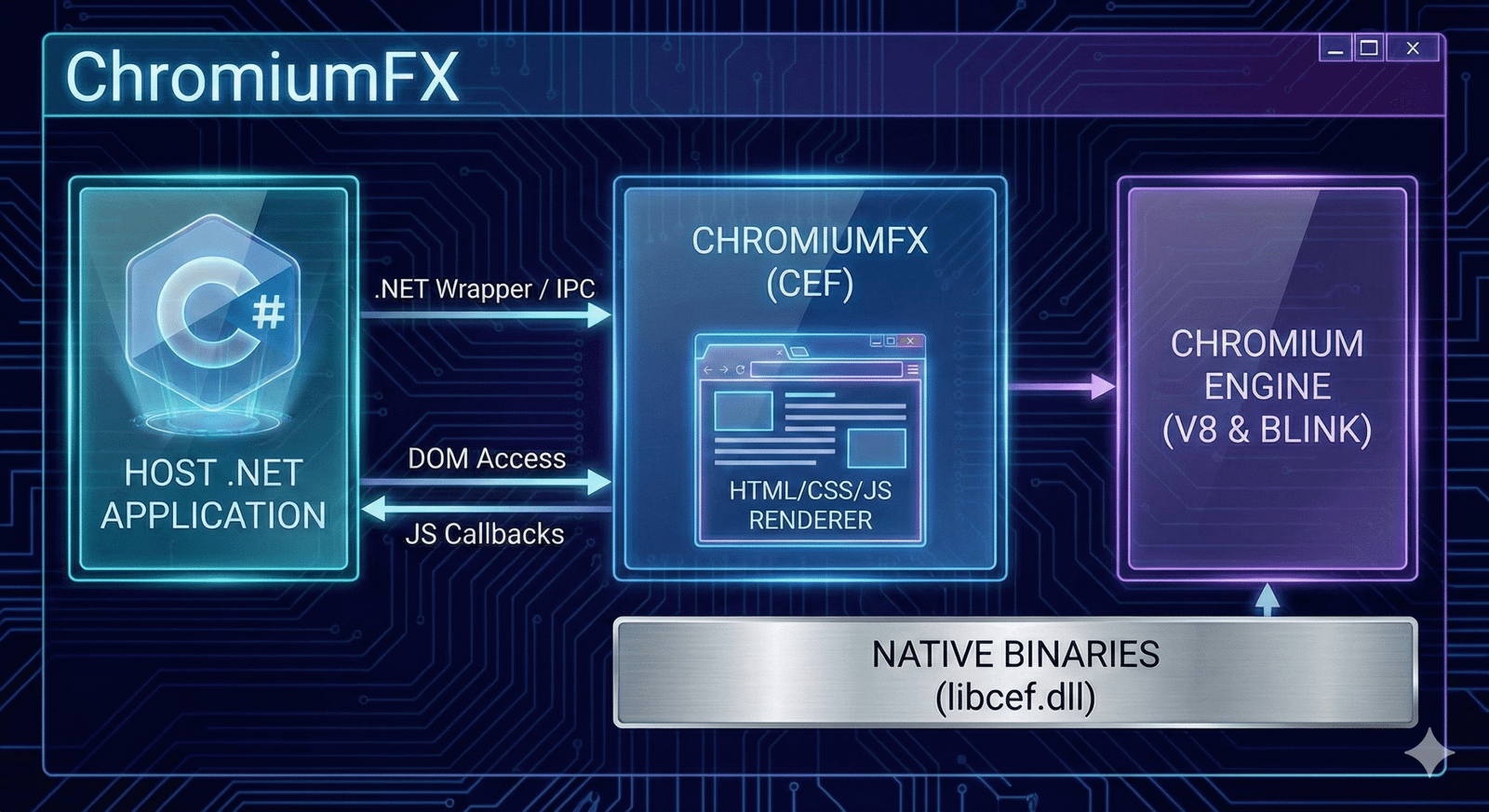
Understanding the architecture is crucial for leveraging the full power of ChromiumFX. Unlike simple wrappers, it respects Chromium’s multi-process design. The “browser” process runs in your main application, while the “render” processes run separately.
This separation ensures that if a web page crashes (e.g., a heavy script freezes), it does not take down your entire desktop application. ChromiumFX manages the Inter-Process Communication (IPC) between these layers transparently, allowing you to execute C# code in response to events happening inside the web page’s JavaScript environment.
Key Features of ChromiumFX
Why do developers flock to ChromiumFX? It is not just about displaying a web page; it is about control.
- Remote DOM Access: You can read and write DOM elements directly from your .NET code.
- V8 JavaScript Integration: Execute JS functions from C# and register C# functions to be called from JS.
- Cookie & Cache Management: Full control over session data and storage.
- Off-Screen Rendering (OSR): Render web content to a bitmap or texture, perfect for game overlays or custom UI frameworks.
ChromiumFX vs. CefSharp vs. WebView2
Choosing the right wrapper is the most common dilemma. Here is how ChromiumFX stacks up against the competition.
Table 1: .NET Browser Embedding Comparison
| Feature | ChromiumFX | CefSharp | WebView2 (Edge) |
| Engine | CEF (Bundled) | CEF (Bundled) | Edge Runtime (System) |
| API Level | Low-level (Near 1:1 with CEF) | High-level (Abstracted) | High-level (Microsoft API) |
| Control | Extreme (Remote Process access) | Moderate | Moderate/High |
| Distribution | Large (Bundles binaries) | Large (Bundles binaries) | Small (Uses OS Runtime) |
| Setup | Complex | Moderate | Easy |
| Best For | Advanced IPC & DOM control | General Browsing | Modern Windows Apps |
Why Choose ChromiumFX Over Alternatives?
While CefSharp is popular, ChromiumFX shines in scenarios requiring granular control. Because it exposes the remote rendering process, you can interact with the V8 engine context directly. This is often limited or harder to achieve in other wrappers. If your application needs to inject complex scripts, intercept network requests at a low level, or manipulate the DOM without relying solely on JavaScript eval, ChromiumFX is often the superior choice.
Getting Started: Installation and Prerequisites
To start using ChromiumFX, you need to prepare your development environment.
- Visual Studio: 2019 or later is recommended.
- .NET Framework: Typically targets .NET 4.6.2+, though .NET Core/.NET 5+ versions are available via forks.
- NuGet: The primary distribution method.
You will typically install the ChromiumFX package alongside the cef.redist (binary distribution) packages matching your architecture (x86 or x64).
Setting Up Your First ChromiumFX Project
Implementing the browser requires initialization logic. Since ChromiumFX relies on native C++ binaries, you must initialize the CEF runtime before creating any UI controls.
- Initialize CEF: Call
CfxRuntime.Initialize()at your application startup. - Create the Browser: Instantiate
ChromiumWebBrowserand add it to your Form or Window. - Load URL: Use the
.LoadUrl()method to navigate. - Shutdown: Always call
CfxRuntime.Shutdown()on app exit to prevent memory leaks.
Handling Inter-Process Communication (IPC)
One of the most powerful features of ChromiumFX is its IPC capability. You can register C# methods that appear as JavaScript objects inside the browser.
- Define the Object: Create a C# class with methods you want to expose.
- Register V8 Handler: Use the
CfrV8Handlerto bind specific JS function names to your C# logic. - Execute: When the web page calls
window.myApp.doSomething(), your C# code executes immediately.
Accessing the DOM Remotely
Unlike standard wrappers that force you to use JavaScript injection to scrape data, ChromiumFX allows “Remote” access. You can traverse the document object model (DOM) nodes from within your .NET code structure.
This means you can iterate through div elements, change attributes, or extract text content using C# types, bypassing the need for fragile string-based JS injection. This feature alone makes ChromiumFX a favorite for automation tools.
Custom Resource Handling and Schemes
Do you want to load files from a database or a zipped archive instead of the disk? ChromiumFX allows you to register custom schemes (e.g., myapp://resource/logo.png).
By implementing a CfxSchemeHandler, you can intercept requests for these custom URLs and serve byte streams directly from memory. This provides a seamless way to secure your application’s assets, preventing users from easily viewing source files in the file explorer.
Debugging ChromiumFX Applications
Debugging a multi-process application can be tricky. ChromiumFX supports remote debugging via Chrome DevTools.
- Enable Remote Debugging: Set the
remote-debugging-portcommand-line switch during initialization. - Connect: Open a standard Chrome browser and navigate to
localhost:your_port. - Inspect: You will see the console, network, and DOM of your embedded browser instance, just like debugging a normal website.
Performance Optimization Tips
To ensure your ChromiumFX application runs smoothly, follow these optimization guidelines:
- Process Management: Ensure you are correctly managing the lifecycle of the render process.
- GPU Acceleration: CEF uses the GPU by default; ensure your target hardware supports it, or disable it via
CfxSettingsif causing stability issues on older VMs. - Memory Usage: Chromium is memory-hungry. Dispose of browser instances when they are no longer visible.
Handling Events and Downloads
ChromiumFX exposes a comprehensive event system. You are not limited to “PageLoaded.”
- LifeSpanHandler: Control popups (block them or open in new tabs).
- DownloadHandler: Intercept file downloads, rename files, or show custom progress bars.
- LoadHandler: Detect HTTP error codes (404, 500) and display custom error pages instead of the default Chromium dinosaur.
Common Issues and Troubleshooting
Developers often encounter specific hurdles when integrating ChromiumFX.
- “DllNotFoundException”: Usually means the
libcef.dllorlibcfx.dllis not in the output directory. Ensure your build process copies these binaries. - Bitness Mismatch: You cannot load x86 binaries in an x64 process. Ensure your project targets
x86orx64explicitly, notAnyCPU. - Blank Screen: Often caused by missing resources or improper initialization of the message loop.
The Future of .NET Browser Embedding
While ChromiumFX is a mature project, the ecosystem is shifting. Microsoft’s WebView2 is becoming the standard for modern Windows apps. However, for applications requiring strict isolation, specific Chromium versions, or deep V8 integration without reliance on the OS version of Edge, ChromiumFX remains a critical tool. It provides a level of independence that system-dependent controls cannot match.
Case Studies: Real-World Use
Who uses ChromiumFX?
- Financial Terminals: For rendering real-time trading charts (TradingView libraries) within secure desktop containers.
- Kiosks: In retail environments where the browser must be locked down, inhibiting navigation and custom rendering.
- Automation Software: QA tools that need to manipulate the DOM programmatically to test web applications.
FAQs
Is ChromiumFX free to use for commercial projects?
Yes, ChromiumFX is open-source, typically released under a BSD-style license. This allows you to use it in proprietary and commercial software without disclosing your source code, provided you retain the copyright notices.
How does ChromiumFX differ from the standard WebBrowser control?
The standard WebBrowser control uses the Internet Explorer (Trident) engine, which is obsolete and does not support modern web standards. ChromiumFX uses the Chromium engine (Blink), supporting the latest HTML5, CSS3, and JavaScript features.
Can I use ChromiumFX in a WPF application?
Absolutely. While ChromiumFX is often associated with WinForms, it can be hosted in WPF using a WindowsFormsHost control. There are also specific WPF implementations available in some forks of the project.
Does ChromiumFX support Chrome Extensions?
Support for extensions in CEF-based wrappers is limited compared to the full Chrome browser. While ChromiumFX allows some extension loading, many APIs required by complex extensions (like account sync) are not available in the embedded framework.
Why is my ChromiumFX application file size so large?
This is normal. ChromiumFX bundles the Chromium engine (libcef.dll and resources), which is essentially a full web browser. This adds approximately 100MB+ to your application’s deployment size, a trade-off for having a self-contained, high-performance browser.
Can I play Netflix or Spotify DRM content in ChromiumFX?
Out of the box, no. Proprietary codecs (H.264, AAC) and Widevine DRM are not included in the standard open-source CEF builds due to licensing. You must build CEF yourself with proprietary codecs enabled to support these services.
Is ChromiumFX actively maintained?
The original repository sees sporadic updates. Many developers use specific forks or moved to WebView2 for active Microsoft support. However, ChromiumFX remains the go-to for specific legacy and advanced integration needs where WebView2’s limitations are a blocker.
Conclusion
ChromiumFX represents a powerful intersection of desktop power and web flexibility. For .NET developers, it unlocks the ability to build modern, responsive, and standards-compliant user interfaces without abandoning the robust C# ecosystem. While it comes with a steeper learning curve than some alternatives, the level of control it offers over the DOM, network stack, and rendering pipeline is unmatched.
By choosing ChromiumFX, you are opting for a “batteries-included” approach to web rendering. You gain independence from the user’s installed browser version and ensure your application looks exactly the way you designed it, on every machine. As you embark on your next hybrid application project, consider the architectural freedom that ChromiumFX provides it might just be the missing link in your development toolkit.