In the modern automotive world, the smartphone has transitioned from a pocket accessory to the very brain of the vehicle’s infotainment system. As we navigate through 2026, the choice between a new vehicle often hinges not just on horsepower or fuel efficiency, but on the digital experience provided by the dashboard. This brings us to the ultimate showdown: Android Auto vs Apple CarPlay. These two platforms have revolutionized how we interact with our cars, offering a safer, more intuitive way to access navigation, music, and communication without ever touching our phones while driving.
The significance of this comparison cannot be overstated. With the rise of electric vehicles (EVs) and smarter integrated cockpits, the “software-defined vehicle” is now the industry standard. Whether you are a dedicated Android enthusiast or an iPhone loyalist, understanding the subtle nuances, strengths, and limitations of each system is crucial for a seamless driving experience. This comprehensive guide offers a deep dive into the technical capabilities, user interface designs, and future-proof features of both platforms. By providing a clear, side-by-side analysis, we aim to solve the dilemma of which ecosystem truly reigns supreme on the open road. By the end of this exploration, you will have a clear roadmap for optimizing your in-car digital lifestyle.
The Core Philosophy of Android Auto vs Apple CarPlay
At their heart, both systems aim to mirror your smartphone’s most important functions onto the car’s display. However, their design philosophies are fundamentally different, reflecting the OS ecosystems they originate from.
- Android Auto: Focuses on Google Assistant integration and a highly customizable, data-rich interface.
- Apple CarPlay: Prioritizes a clean, uniform “grid-like” design that mirrors the iOS experience for instant familiarity.
- Common Goal: Both strive to reduce driver distraction by utilizing voice commands and simplified touch targets.
- Connectivity: Both support wired (USB-C) and wireless connections in most 2026 vehicle models.
User Interface (UI) Design and Customization
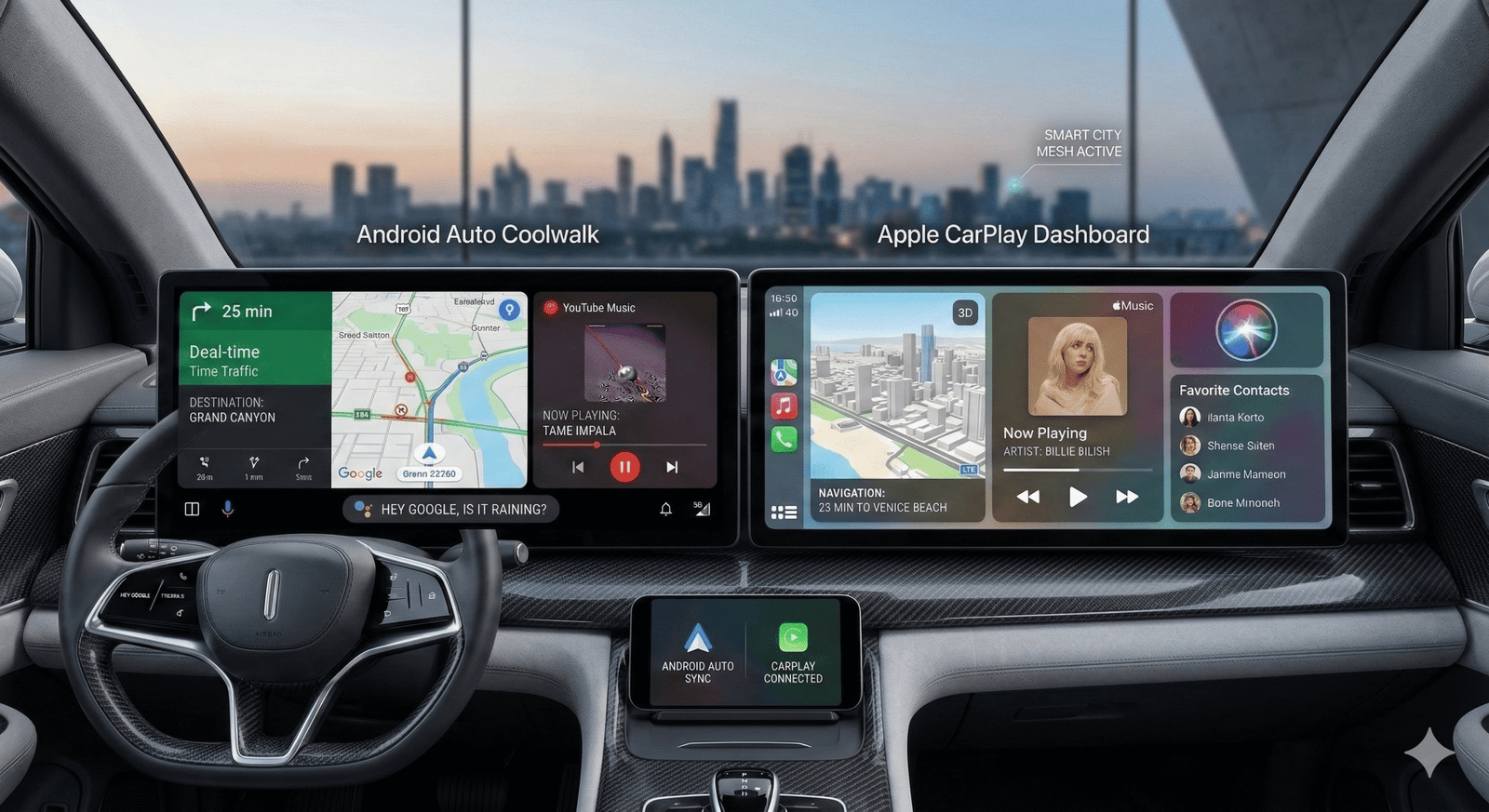
The visual layout is where the Android Auto vs Apple CarPlay debate often starts. Android Auto offers a more dynamic “Coolwalk” interface, while CarPlay sticks to its tried-and-true simplicity.
- Coolwalk Interface: Android Auto uses a split-screen view that allows you to see navigation and media controls simultaneously.
- Dashboard View: CarPlay offers a similar multi-window view but with a more rigid, Apple-standardized aesthetic.
- Wallpaper Support: Both platforms now allow users to change the background to match their car’s interior.
- App Icons: CarPlay uses identical icons to your iPhone, whereas Android Auto adapts them for better legibility on car screens.
Navigation Mastery: Google Maps vs Apple Maps
Navigation is the primary reason most people use these systems. The battle between Google Maps, Waze, and Apple Maps is a core part of the Android Auto vs Apple CarPlay experience.
- Google Maps Dominance: Often cited as the most accurate for real-time traffic and local business data.
- Waze Integration: While available on both, Waze often feels more “native” on Android Auto due to Google’s ownership.
- Apple Maps Evolution: In 2026, Apple Maps has caught up significantly, offering stunning 3D city details and better lane guidance.
- Offline Capability: Google Maps offers superior offline map downloading, which is vital for long trips in dead zones.
Voice Assistant Integration: Assistant vs Siri
Hands-free control is the safest way to operate a vehicle. The choice between Google Assistant and Siri can make or break the driving experience.
- Google Assistant: Widely considered more capable of handling complex, conversational queries and controlling smart home devices from the road.
- Siri: Offers deep integration with the Apple ecosystem and excels at simple tasks like sending iMessages or setting reminders.
- Wake Words: “Hey Google” and “Siri” are both highly responsive, though Assistant tends to have better noise-cancellation in loud cabins.
- Voice Search: Google’s search engine backbone gives it a massive edge when asking for specific obscure locations.
App Ecosystem and Third-Party Support
While both support the “big” apps like Spotify, WhatsApp, and Audible, the way they handle third-party integration varies in the Android Auto vs Apple CarPlay ecosystem.
- Messaging: CarPlay handles iMessage flawlessly, while Android Auto supports a wider variety of RCS and SMS protocols.
- Music Apps: Both support Spotify, YouTube Music, Apple Music, and Tidal with full-screen controls.
- Podcasts: Dedicated apps for both platforms allow for easy resuming of episodes across devices.
- Category Restrictions: Both Google and Apple strictly vet apps to ensure they aren’t distracting (no video streaming while driving).
Wireless Connectivity and Stability
In 2026, wires are becoming a thing of the past. However, wireless stability remains a point of contention for many drivers.
- Wireless Standard: Most new cars now come with wireless Android Auto and CarPlay as standard.
- Latency: Apple CarPlay generally has a slightly lower latency when switching tracks or inputting addresses wirelessly.
- Battery Drain: Wireless use is taxing on phone batteries; using a wireless charging pad in the car is highly recommended.
- Reconnection Speed: Android Auto has improved significantly, often connecting to the car’s head unit within 5 seconds of ignition.
Comparison Table: Technical Specifications
| Feature | Android Auto (2026) | Apple CarPlay (2026) |
| OS Requirement | Android 8.0 or higher | iPhone 5s or higher (iOS 13+) |
| Interface Style | Dynamic / Modular (Coolwalk) | Grid-based / Static Dashboard |
| Primary Assistant | Google Assistant | Siri |
| Navigation Options | Google Maps, Waze, HereWeGo | Apple Maps, Google Maps, Waze |
| Third-Party Apps | Open / Extensive | Curated / Strict |
| Customization | High (Icons, Widgets, Layout) | Moderate (Wallpaper, Icon Order) |
| EV Integration | Deep (Battery/Charging stats) | Growing (Apple Maps EV routing) |
EV Integration and Future-Proofing
With the shift to electric vehicles, the Android Auto vs Apple CarPlay competition has moved to the battery.
- Charging Stop Planning: Android Auto integrates directly with the car’s SoC (State of Charge) to suggest charging stops in real-time.
- Apple Maps EV Routing: CarPlay now supports specific EV routing for select manufacturers like Ford and Porsche.
- Climate Control: The newest “Next-Gen CarPlay” aims to take over the whole dash, including AC controls, though adoption is slow.
- Android Automotive OS: Note the difference this is the built-in car OS (like in Volvos), which is separate from the Android Auto phone projection.
Messaging and Communication Handling
Safety is paramount when responding to texts. Both platforms handle this via voice-to-text, but the “read-back” quality differs.
- Reading Messages: Siri has a more “human” tone when reading iMessages, while Assistant is faster at parsing group chats.
- WhatsApp/Telegram: Both platforms offer excellent support for third-party messaging apps with voice reply capabilities.
- Phone Calls: The calling UI on both is clean, but CarPlay’s integration with “Favorites” and “Recents” feels more seamless for iPhone users.
- Privacy: Both allow you to hide message previews on the car screen to prevent passengers from reading your private texts.
Music and Audio Fidelity
For the audiophiles, the Android Auto vs Apple CarPlay battle includes bitrate and ease of browsing.
- Hi-Res Audio: Both support high-quality streaming, but wired connections are still superior for lossless audio.
- Interface: CarPlay’s music interface is more visual, using large album art, whereas Android Auto focuses on list-based browsing for safety.
- Radio Integration: Some newer versions allow you to switch back to the car’s native FM/DAB radio without leaving the projection screen.
- Audio Ducking: Both systems intelligently lower the music volume when navigation instructions are spoken.
Case Study: User Satisfaction in 2025
A recent study conducted among 5,000 drivers in the US and Europe highlighted a shifting trend in the Android Auto vs Apple CarPlay preference.
- The Switchers: 15% of users admitted that their car’s compatibility influenced their next smartphone purchase.
- Ease of Use: CarPlay won on “Initial Setup” and “Simplicity.”
- Functionality: Android Auto won on “Voice Search Accuracy” and “Map Detail.”
- Reliability: Wired connections reported 98% uptime, while wireless fluctuated at 92% due to interference in urban areas.
Next-Generation CarPlay: The Dash Takeover
Apple is pushing for a total takeover of the car’s instrument cluster. This “Version 2.0” of CarPlay represents a massive shift.
- Multi-Display Support: CarPlay 2.0 can power the speedometer, fuel gauge, and secondary screens.
- Vehicle Data Access: It can see tire pressure, oil temp, and more, presenting them in Apple’s signature design.
- Manufacturer Resistance: Some brands (like GM) are moving away from projection in favor of built-in Google systems to keep control of user data.
- Personalization: Users can choose different “Gauge” styles, from classic analog looks to ultra-modern digital readouts.
Android Auto’s Modular Approach
Google isn’t sitting still. Their approach focuses on flexibility and making the phone-to-car transition invisible.
- Adaptive Layouts: Android Auto automatically adjusts its grid based on whether your car screen is horizontal, vertical, or a “pillar-to-pillar” display.
- Google Play Store: Some “Automotive” versions allow for downloading apps directly to the car without the phone being present.
- Secondary Screen Support: Google is working on better support for “Head-Up Displays” (HUDs) and passenger screens.
- Phone-as-a-Key: Deep integration with digital car keys stored in the Android Wallet.
Stability and Troubleshooting Common Issues
No system is perfect. Drivers often encounter “black screens” or disconnects.
- Cable Quality: 90% of wired connection issues are caused by low-quality or damaged USB cables.
- Cache Clearing: On Android Auto, clearing the app cache on your phone often fixes random glitches.
- Update Lag: Ensure both your phone and the car’s head unit firmware are up to date.
- Interference: Wireless connections can drop near high-power radio towers or certain toll booths.
FAQs
Can I use both Android Auto and Apple CarPlay in the same car?
Yes, most modern vehicles (from 2017 onwards) are compatible with both systems. However, you can only run one at a time depending on which phone is plugged in or connected wirelessly.
Which navigation app is better for Android Auto?
Google Maps is the gold standard for accuracy and integration. However, many users prefer Waze for its superior police alerts and community-driven hazard reporting.
Does Apple CarPlay work with an Android phone?
No. Apple CarPlay requires an iPhone (iPhone 5 or newer). Similarly, Android Auto requires an Android smartphone running Android 8.0 or higher.
Is there a monthly fee for using these systems?
No, both Android Auto and Apple CarPlay are free to use. You only need a compatible car and a smartphone with a data plan.
Which system is safer for driving?
Both are significantly safer than using a handheld phone. However, Google Assistant’s superior natural language processing often makes it easier to perform tasks without looking at the screen compared to Siri.
Do I need a special cable for a wired connection?
For 2026 models, a high-quality USB-C to USB-C cable is recommended. Avoid “charging-only” cables; you must use a data-certified cable to ensure the projection works.
Why did GM stop supporting CarPlay and Android Auto?
General Motors decided to switch to a built-in “Google Built-In” (Android Automotive) system to better integrate with EV battery management and to have more control over the user experience and data.
Conclusion
The battle of Android Auto vs Apple CarPlay in 2026 is less about which one is “better” and more about which ecosystem you have already invested in. Apple CarPlay remains the champion of simplicity and aesthetic consistency, making it the perfect choice for users who want their car to feel exactly like their iPhone. On the other hand, Android Auto offers a more powerful, flexible, and information-dense experience, powered by the unmatched intelligence of Google Assistant and the versatility of Google Maps.
In summary, the choice between the two often dictates the hardware you carry in your pocket. As cars become more like “computers on wheels,” these platforms provide a comprehensive solution to the problem of staying connected while staying safe. Whether you prefer the modular “Coolwalk” tiles of Android or the familiar “App Grid” of iOS, both systems have successfully moved the focus from the car’s clunky native software to the sleek, updated power of our smartphones. As we look toward a future of fully autonomous driving and pillar-to-pillar screens, the integration of our digital lives into our vehicles will only deepen. The winner of this battle is ultimately the driver, who now has more choice, better safety, and superior entertainment than ever before.