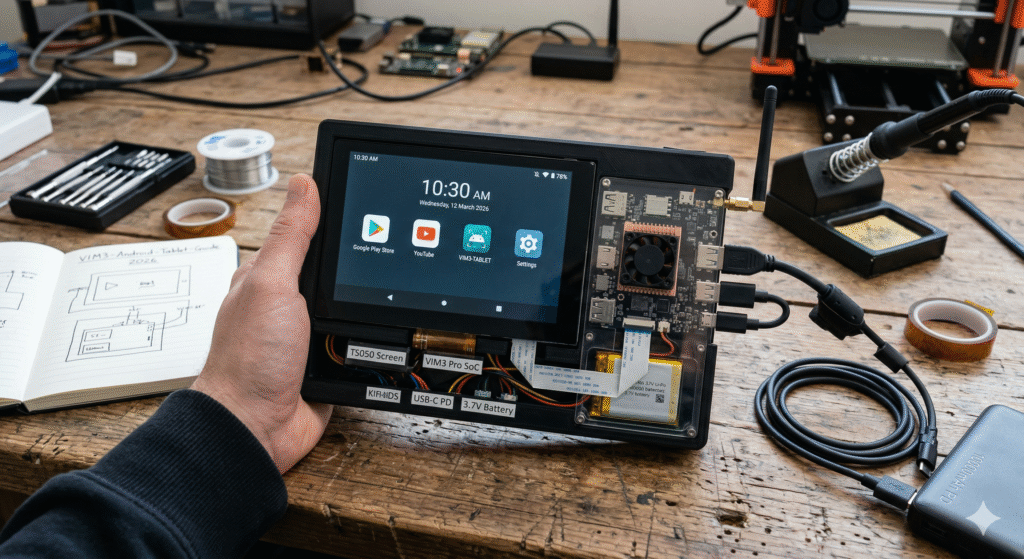
The world of mobile computing is shifting. While big-name brands dominate the store shelves, a growing community of tech enthusiasts is looking for more more control, more power, and more customization. This is where the VIM3 Android tablet project enters the spotlight. By using the Khadas VIM3 Single Board Computer (SBC) as the “brain” of a custom-built device, you aren’t just buying a gadget; you are engineering a high-performance workstation that fits in your hand.
In this comprehensive guide, we will explore why the VIM3 is the gold standard for DIY tablets in 2026. Whether you are a developer looking for an AOSP (Android Open Source Project) testbed or a hobbyist wanting a powerful media center, building a VIM3 Android tablet offers a level of flexibility that off-the-shelf iPads or Samsung Tabs simply cannot match. We will dive into the hardware requirements, the software installation process, and how to optimize your build for peak performance.
What is a VIM3 Android Tablet?
A VIM3 Android tablet is a custom-made portable computer powered by the Khadas VIM3 board. Unlike standard tablets, this DIY version allows you to choose your own screen, battery capacity, and even add features like 4G LTE or M.2 NVMe storage. It runs on the Android operating system, giving you access to millions of apps while maintaining the “open” nature of a development board.
- Core Heart: Powered by the Amlogic A311D SoC.
- OS Flexibility: Supports Android 11, 12, and the latest AOSP builds.
- Custom Build: Users can integrate specialized MIPI-DSI touchscreens.
- Expandability: Includes an M.2 slot for SSDs or cellular modules.
Choosing the Right Khadas VIM3 Model
Before starting your VIM3 Android tablet build, you must decide between the “Basic” and “Pro” versions of the board. The Pro version is highly recommended for tablet builds because Android is a memory-hungry operating system, especially when multitasking or running high-definition video.
- VIM3 Pro: 4GB LPDDR4X RAM and 32GB eMMC storage (Best for tablets).
- VIM3 Basic: 2GB RAM and 16GB eMMC (Better for simple IoT tasks).
- SoC: Both feature the powerful Amlogic A311D (4x A73 + 2x A53 cores).
- Graphics: Both use the Mali-G52 MP4 GPU for smooth Android UI rendering.
Essential Components for Your Tablet Project
Building a VIM3 Android tablet requires more than just the SBC. You need a “kit” of parts to make it truly portable and functional. Connectivity is key, so ensure your peripherals are compatible with the Khadas ecosystem to avoid driver headaches during the Android setup.
- Display: Khadas TS050 Touch Screen (5-inch) or third-party MIPI/HDMI screens.
- Power: A high-quality USB-C power bank or a 3.7V Li-Po battery with a UPS module.
- Casing: 3D-printed frames or acrylic housing to hold the board and screen.
- Input: Bluetooth keyboards or integrated USB controllers for gaming.
Why Amlogic A311D is Perfect for Android
The “brain” of the VIM3 Android tablet is the Amlogic A311D. This chip was specifically designed with high-end multimedia and AI in mind. In 2026, it remains a top-tier choice for DIY tablets because it handles Android’s graphic-heavy interface without lagging.
- Speed: Clock speeds up to 2.2GHz ensure snappy app launches.
- Efficiency: The 12nm process keeps the board cool during long usage sessions.
- Video: Native support for 4K@60fps H.265 decoding ideal for a media tablet.
- AI Power: A 5.0 TOPS NPU for advanced image recognition apps.
VIM3 vs. VIM4: Which is Better for a Tablet?
While the VIM4 is a newer board, the VIM3 Android tablet remains a favorite for many due to its established AOSP support and lower price point. The VIM4 offers more power, but the VIM3’s A311D chip has matured drivers that make the Android experience very stable.
Comparison Table: VIM3 vs. VIM4 for Tablet Use
| Feature | Khadas VIM3 Pro | Khadas VIM4 |
| CPU | Amlogic A311D (6-core) | Amlogic A311D2 (8-core) |
| RAM | 4GB LPDDR4X | 8GB LPDDR4X |
| NPU | 5.0 TOPS | 3.2 TOPS |
| Video Out | HDMI 2.1 (4K) | HDMI 2.1 (4K/8K) |
| Best Use | Media & AOSP Development | Heavy Multitasking & Gaming |
Setting Up Android on VIM3
Installing the OS on your VIM3 Android tablet is straightforward thanks to Khadas’ OOWOW system. OOWOW is an embedded service that allows you to download and install Android directly from the cloud without needing a separate PC to flash SD cards.
- OOWOW Boot: Hold the “Function” key during boot to enter the installer.
- Firmware Choice: Select the official Android image (e.g., Android 11 or 12).
- Installation: Flash the image directly to the onboard eMMC for maximum speed.
- Updates: Use OTA (Over-The-Air) updates provided by the Khadas community.
Display Selection: MIPI-DSI vs. HDMI
The screen is the most important part of your VIM3 Android tablet. You have two main choices: MIPI-DSI (direct ribbon cable) or HDMI. MIPI-DSI is better for tablets because it is more power-efficient and allows for a thinner build, though it requires specific drivers.
- TS050 Screen: Official Khadas MIPI screen; “plug and play” with Android.
- HDMI Screens: Easier to find in larger sizes (7″ or 10″) but require extra cables.
- Touch Input: Capacitive touch is essential for a fluid Android experience.
- Resolution: Aim for at least 1080p for a crisp 2026-standard display.
Power Management for Portability
A VIM3 Android tablet isn’t a tablet if it’s always plugged into a wall. You need a reliable battery solution. Because the VIM3 supports USB-C Power Delivery (PD), you can use modern high-output power banks to keep your device running for hours.
- Voltage: The VIM3 typically requires 5V to 20V via USB-C.
- UPS Module: Consider the Khadas Juce board for integrated battery management.
- Capacity: A 10,000mAh battery can provide 6-8 hours of continuous use.
- Cooling: Tablets generate heat; ensure your case has vents or a small fan.
Leveraging the 5.0 TOPS NPU
One unique feature of the VIM3 Android tablet is its Neural Processing Unit (NPU). While most tablets use the CPU for everything, the VIM3 can offload AI tasks like face recognition or real-time translation to the NPU, saving battery and increasing speed.
- AI Apps: Use the NPU for custom camera filters or voice processing.
- Developer Tools: Access the NPU via the Khadas SDK in your Android apps.
- Object Detection: Perfect for building a “smart” tablet for home security.
- Efficiency: Offloading to the NPU keeps the CPU free for smooth UI navigation.
Expanding Storage with M.2 NVMe
Most budget tablets are stuck with slow internal storage. Your VIM3 Android tablet can be upgraded with a lightning-fast M.2 NVMe SSD. This allows you to store thousands of movies, large apps, and developer files without slowing down the system.
- Slot Type: The VIM3 features an M.2 slot on the bottom of the board.
- Speed: NVMe storage is significantly faster than the built-in eMMC.
- Setup: Android can be configured to use the SSD as “Internal Storage.”
- Versatility: Use the slot for a 4G/5G module instead if you need mobile data.
Customizing the Android UI
Since you are using a development board, your VIM3 Android tablet doesn’t have to look like a standard phone. You can install custom launchers, change the DPI (dots per inch) to fit your screen size, and even root the device for total control.
- Launchers: Try “Nova Launcher” or “ATV Launcher” for a clean look.
- Resolution: Use the Android settings to match your specific LCD panel.
- Root Access: Khadas Android builds often come with easy root toggles.
- App Store: Install the Google Play Store or use open-source alternatives like F-Droid.
Connectivity: Wi-Fi 5 and Bluetooth 5.0
In 2026, staying connected is non-negotiable. The VIM3 Android tablet comes with built-in dual-band Wi-Fi and Bluetooth. This allows you to connect to high-speed internet and use wireless peripherals like headphones and gamepads effortlessly.
- RSDB Wi-Fi: Allows the board to transmit and receive data on two bands at once.
- Bluetooth: Connect wireless controllers for an “Android Gaming Console” feel.
- External Antennas: The VIM3 includes IPEX connectors for better signal range.
- Ethernet: If your tablet is docked, you can use the Gigabit LAN port.
Case Study: The “Pro-Dev” Portable Workstation
Many developers use the VIM3 Android tablet as a portable “Linux/Android hybrid.” By using a dual-boot setup, they can use Android for entertainment and switch to Ubuntu for coding.
- User Goal: A device that runs Android apps but has a full Linux terminal.
- Hardware: VIM3 Pro, 10-inch HDMI Touchscreen, 128GB NVMe SSD.
- Outcome: A custom tablet that outperforms $500 commercial tablets in raw compiling speed.
- Portability: Housed in a custom 3D-printed case with a 15,000mAh battery.
Building a Gaming-Centric VIM3 Tablet
With the Mali-G52 GPU, the VIM3 Android tablet is a powerhouse for retro gaming and Android titles. You can turn your DIY project into a portable gaming rig that rivals dedicated handhelds.
- Emulation: Runs PS1, N64, and many PSP games at full speed.
- Native Gaming: Plays titles like Genshin Impact or PUBG on medium settings.
- Cooling: Use the Khadas “New VIM Heatsink” and 3705 Cooling Fan.
- Controllers: Full support for Xbox and PlayStation controllers via Bluetooth.
Future-Proofing Your VIM3 Project
The beauty of the VIM3 Android tablet is that it isn’t “locked” like a retail product. As new versions of Android or Linux are released, the community creates new images. Your hardware remains relevant because you can always swap a battery or upgrade the SSD.
- Community Support: Active forums on Khadas.com for troubleshooting.
- Mainline Linux: The VIM3 is one of the best-supported boards for the Linux kernel.
- Sustainability: Repairing a DIY tablet is much easier than a sealed iPad.
- Learning: Building this device teaches you about kernel headers, drivers, and hardware assembly.
Comparison of Popular DIY Tablet Boards
| Board | GPU Performance | Android Support | Price (Approx) |
| Khadas VIM3 | High (Mali G52) | Excellent (AOSP) | $130 |
| Raspberry Pi 4 | Medium | Community Only | $55 |
| Orange Pi 5 | Very High | Developing | $110 |
FAQs
What is the best screen for a VIM3 Android tablet?
The official Khadas TS050 is the best choice for a 5-inch build because it uses the MIPI-DSI port and requires no extra power cables. For larger 10-inch builds, look for HDMI capacitive touchscreens that are compatible with “Raspberry Pi” or “Universal” drivers.
Can the VIM3 run the latest Google Play Store?
Yes, but you usually need to install “Open GApps” or a similar package if the base Android image is a pure AOSP build. Many community images for the VIM3 come with the Play Store pre-installed.
Is the VIM3 powerful enough for 4K video playback?
Absolutely. The Amlogic A311D inside the VIM3 Android tablet supports hardware decoding for 4K H.265/VP9 videos at 60fps, making it an incredible media consumption device.
Does the VIM3 tablet support mobile data (SIM card)?
Yes, but you will need an M.2 to Mini-PCIe adapter or a compatible M.2 LTE/5G module. You will also need to ensure the Android firmware you are using includes the RIL (Radio Interface Layer) drivers for your specific modem.
How do I cool my VIM3 tablet?
Since a tablet case is often cramped, we recommend the Khadas 3705 Cooling Fan. Android will automatically manage the fan speed based on the temperature of the A311D processor.
Can I dual-boot Android and Linux on the VIM3?
Yes! You can install Android on the internal eMMC and run a Linux distribution like Ubuntu or Armbian from a fast SD card or an NVMe SSD. You can switch between them at boot time.
Is a VIM3 tablet better than a cheap retail tablet?
For a regular user, a retail tablet is easier. However, for a power user or developer, the VIM3 Android tablet is better because it offers a 5.0 TOPS NPU, an M.2 SSD slot, and a completely open operating system without bloatware.
Conclusion
Building a VIM3 Android tablet in 2026 is one of the most rewarding projects for any tech enthusiast. It bridges the gap between a standard consumer device and a powerful development workstation. With its Amlogic A311D processor, dedicated NPU, and incredible expandability, the VIM3 provides a hardware foundation that is both versatile and future-proof.
Throughout this guide, we have seen that the “DIY” approach doesn’t mean sacrificing quality. By selecting the right MIPI-DSI screen, optimizing your cooling, and utilizing the OOWOW system for software installation, you can create a device tailored specifically to your needs whether that is gaming, coding, or high-definition media playback.
If you are tired of the limitations imposed by big-tech ecosystems, the VIM3 Android tablet is your path to digital freedom. Start by grabbing a VIM3 Pro board, exploring the Khadas community forums, and joining thousands of other makers who are redefining what mobile computing looks like. Your custom-built future is just a few assembly steps away!