Introduction
In the modern educational landscape, data fragmentation is a silent productivity killer. Teachers often find themselves trapped in a cycle of “double entry” grading an assignment in a digital platform like Google Classroom, only to manually re-enter that same grade into the district’s official Student Information System (SIS). This redundancy not only wastes thousands of hours annually but also introduces human error, leading to inaccurate report cards and frustrated parents.
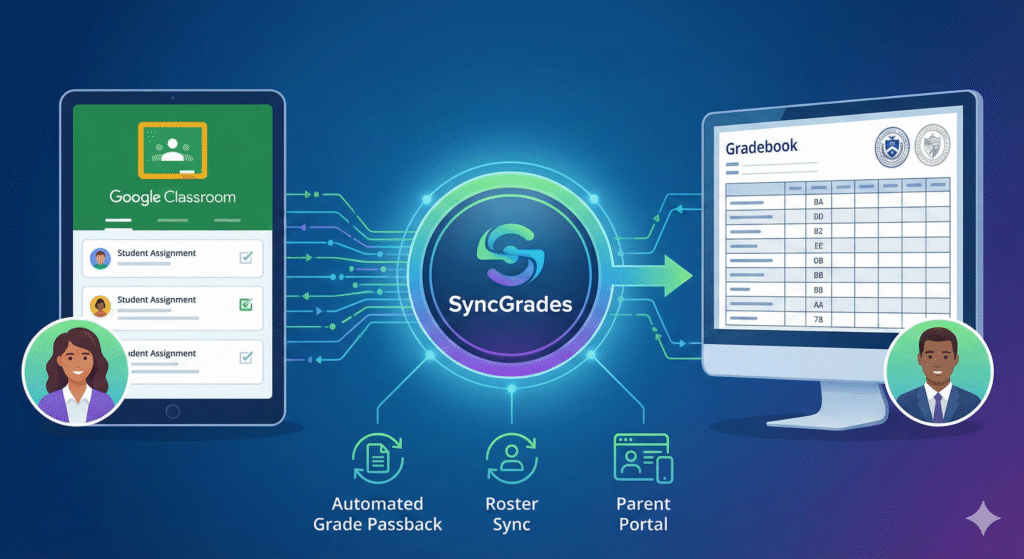
Enter SyncGrades, a powerful educational technology tool designed to dismantle these silos. By acting as a seamless digital bridge, SyncGrades connects instructional platforms with administrative gradebooks, automating the flow of academic data. Whether you are a teacher looking to reclaim your evenings, an administrator aiming for data accuracy, or a parent seeking real-time transparency into your child’s performance, SyncGrades offers a robust solution.
This comprehensive guide explores how SyncGrades is revolutionizing academic reporting, specifically focusing on its integration with Google Classroom, its benefits for stakeholders, and how to navigate its ecosystem effectively.
What is SyncGrades? The Digital Handshake Explained
SyncGrades is a specialized interoperability software designed to synchronize data between Learning Management Systems (LMS) and official Student Information Systems (SIS). While widely used across various districts, it has gained particular prominence in systems like the New York City Department of Education (NYC DOE) as a connector between Google Classroom and official registries like STARS.
At its core, SyncGrades functions as a data translator. It takes the “instructional data” (grades, feedback, assignment completion) from the classroom environment and converts it into “administrative data” (official transcripts, report cards, attendance records).
Core Functions:
- Automated Grade Passback: Transfers scores from LMS to SIS without manual typing.
- Roster Synchronization: Ensures student lists in the gradebook match the actual classroom.
- Unified Parent Portal: Provides a single dashboard for parents to view consolidated academic data.
The “Double Entry” Problem and the SyncGrades Solution
Before tools like SyncGrades, the workflow for a typical digital assignment looked like this:
- Teacher creates assignment in Google Classroom.
- Student submits work.
- Teacher grades it in Google Classroom.
- Teacher opens a separate window for the official gradebook.
- Teacher manually types the grade again.
This “swivel-chair” data entry is prone to transcription errors. A 98 can easily become an 89 with a slip of a finger. SyncGrades eliminates steps 4 and 5. By mapping assignments directly, the grade entered in the LMS automatically populates in the official record, ensuring 100% data integrity.
Key Features for Teachers and Administrators
SyncGrades is more than just a copy-paste bot; it is a comprehensive management tool.
Seamless Google Classroom Integration
The platform’s standout feature is its deep integration with Google Workspace for Education. It recognizes assignments, categories (homework, test, project), and point values, mapping them intelligently to the corresponding columns in the SIS.
Intelligent Error Detection
SyncGrades includes validation logic. If a grade is entered that exceeds the maximum point value (e.g., entering 105 in a field capped at 100), the system flags the anomaly before it corrupts the official record.
Attendance Monitoring
Beyond academics, SyncGrades often syncs attendance data. This allows teachers to mark a student present or absent in one platform and have that status reflect across the ecosystem, saving valuable instructional time at the start of class.
Admin-Level Oversight
For school leaders, SyncGrades provides a macro view of grade distribution. Principals can spot trends such as a high failure rate in a specific department before report cards are finalized, allowing for proactive intervention.
Empowering Parents: The Transparency Revolution
One of the most significant value propositions of SyncGrades is its impact on home-school communication. Traditional report cards are “lagging indicators” they tell parents what happened weeks ago. SyncGrades offers “leading indicators.”
- Real-Time Alerts: Parents can see the moment a grade is posted or if an assignment is marked “missing.”
- Assignment Tracking: The portal displays due dates and descriptions, preventing the classic “I don’t have any homework” excuse.
- Holistic View: Instead of logging into five different Google Classrooms, a parent gets a consolidated view of their child’s performance across all subjects.
SyncGrades vs. Google Classroom: Understanding the Difference
A common source of confusion is the relationship between these two platforms. They are partners, not competitors.
| Feature | Google Classroom (LMS) | SyncGrades (Connector/SIS Tool) |
| Primary Purpose | Teaching, learning, and assignment distribution. | Administrative reporting and official record-keeping. |
| User Focus | Students and Teachers. | Admins, Registrars, and Parents. |
| Data Type | Formative (drafts, feedback, raw scores). | Summative (final grades, transcripts). |
| Report Cards | Cannot generate official report cards. | Generates or feeds data for official report cards. |
Think of Google Classroom as the kitchen where the meal (learning) is prepared, and SyncGrades as the menu that presents the final result to the customers (parents/admin).
Troubleshooting Common SyncGrades Issues
Like any complex software integration, SyncGrades is not immune to technical hiccups. Here are common issues and how to resolve them.
The “CI2” Error or Sync Failure
This usually occurs when the assignment in Google Classroom creates a conflict with the SIS settings.
- Fix: Ensure the assignment title does not contain special characters that the SIS rejects. Also, verify that the grade category (e.g., “Exam”) exists in both systems.
Rostering Mismatches
Sometimes a student appears in Google Classroom but not in SyncGrades.
- Cause: The student may have recently enrolled, and the overnight database refresh hasn’t occurred yet.
- Fix: Wait 24 hours for the district’s central database to update the roster cache.
Login Loops
Users often report getting stuck on the login screen, especially when navigating through district portals like NYC’s TeachHub.
- Fix: Clear your browser cache and cookies. Ensure you are using the correct district email credentials, not a personal Gmail account.
Best Practices for Implementation
To get the most out of SyncGrades, schools should adopt a standardized approach:
- Uniform Naming Conventions: Teachers should use consistent naming for assignments to make the sync logs easier to read.
- Regular Sync Intervals: While some systems sync automatically overnight, teachers should perform a manual “force sync” before major reporting deadlines to ensure all recent data is captured.
- Parent Onboarding: Schools must actively train parents on how to access the portal. A tool is only useful if stakeholders look at it.
The Future of EdTech Interoperability
SyncGrades represents a broader trend in educational technology: Interoperability. As schools adopt more niche tools one for math, one for reading, one for coding the need for a central “hub” that connects these spokes becomes critical.
Future iterations of tools like SyncGrades will likely include AI-driven insights, predicting student performance trends based on historical sync data, and suggesting interventions automatically. We are moving away from simple data transfer toward intelligent data analysis.
Frequently Asked Questions
Is SyncGrades free for parents and students?
Yes, typically the school district pays for the license. Parents and students can download the app or access the web portal for free, provided their school has an active subscription.
How often does SyncGrades update data?
This depends on the district’s settings. Most systems perform an automatic sync nightly (every 24 hours). However, teachers often have a “Sync Now” button to push immediate updates for urgent grade changes.
Can I change a grade in SyncGrades if it’s wrong in Google Classroom?
It is best practice to change the grade in the source (Google Classroom) and let it re-sync. Changing it manually in SyncGrades/SIS might break the link, causing the old grade to revert during the next automatic sync.
Why can’t I see my child’s attendance in SyncGrades?
If attendance is missing, the school may not have enabled that specific module, or they may use a different system for official attendance tracking that doesn’t integrate with the grade viewer.
Does SyncGrades work with Schoology or Canvas?
While SyncGrades is most famous for its Google Classroom integration, the underlying technology (LTI and API connecting) can technically support other LMS platforms. However, checking with your specific district’s IT department is essential as implementations vary.
Is my child’s data secure on SyncGrades?
Yes, reputable ed-tech platforms like SyncGrades must comply with strict federal laws like FERPA (Family Educational Rights and Privacy Act) and COPPA (Children’s Online Privacy Protection Act), ensuring data is encrypted and never sold to third parties.
What do I do if I forgot my SyncGrades password?
Since SyncGrades is usually tied to your district’s official login (like a school email or parent account), you typically cannot reset the password inside SyncGrades itself. You must reset your main district/school account password.
Conclusion
In an era where data is the new currency of education, SyncGrades serves as an essential infrastructure investment. It liberates teachers from the drudgery of data entry, allowing them to focus on what truly matters: instruction and mentorship. For parents, it opens a window into the classroom, fostering a collaborative environment where student support is proactive rather than reactive.
By bridging the gap between the dynamic learning environment of Google Classroom and the rigid structure of official records, SyncGrades ensures that every student’s effort is accurately recorded, visible, and celebrated. As educational ecosystems become increasingly complex, the simplicity and reliability of SyncGrades make it a standout tool in the modern school’s tech stack.