
In modern enterprise data centers, managing virtual environments without clear visibility into software layers introduces severe operational vulnerabilities. IT departments frequently face the complex challenge of mapping how virtual machines interact, which services are live, and how infrastructure modifications might impact business-critical applications. Without specialized tooling, cross-tier relationships remain hidden, turning simple infrastructure updates or routine migrations into high-risk operations capable of causing unexpected downtime.
vRealize Infrastructure Navigator addresses these operational hurdles by delivering agentless, automated discovery and comprehensive dependency mapping across the entire virtual ecosystem. Functioning as a specialized virtual appliance integrated within the VMware ecosystem, this technology elevates situational awareness by scanning network traffic and system behaviors directly through the hypervisor layer. This comprehensive guide details the internal mechanics, deployment workflows, and strategic optimization techniques required to transform raw infrastructure data into actionable operational clarity.
What Is vRealize Infrastructure Navigator?
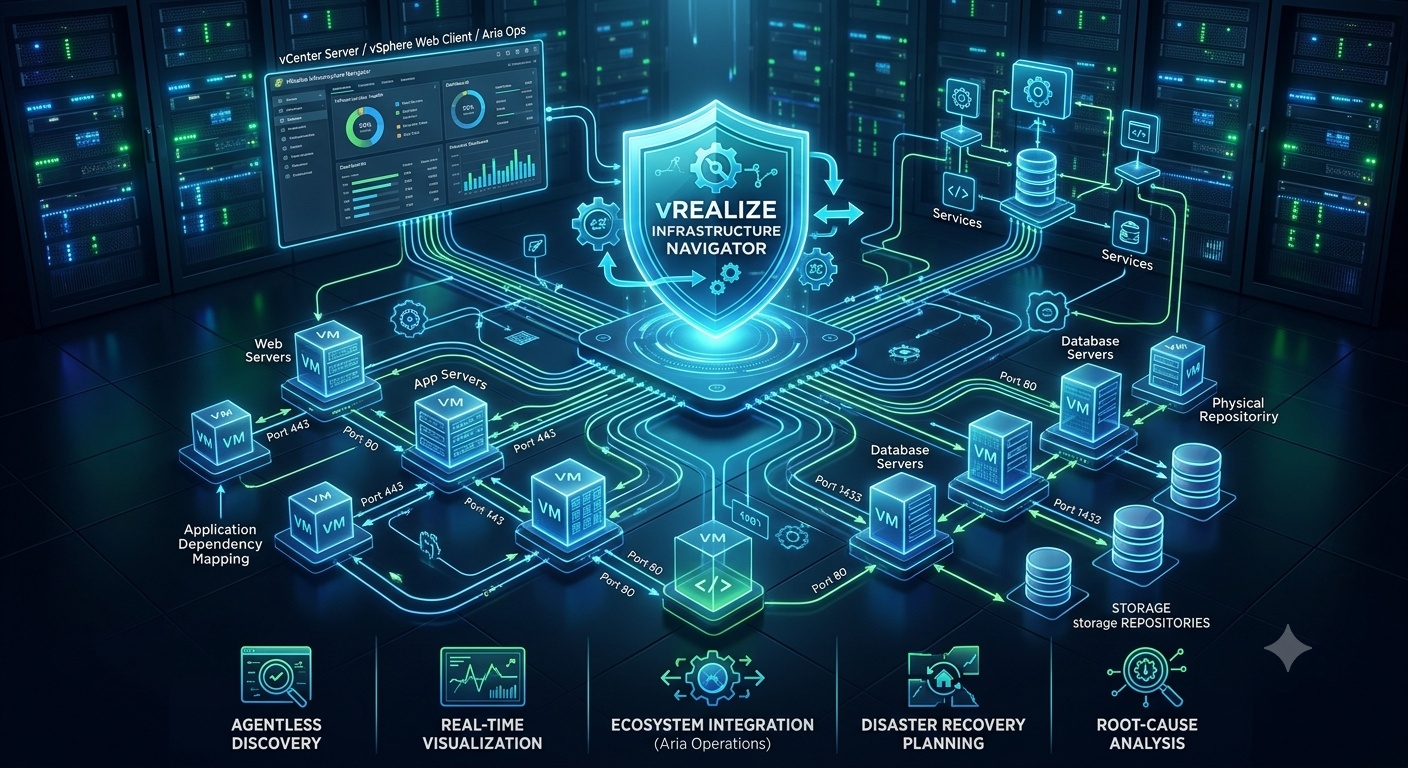
vRealize Infrastructure Navigator is an application-aware discovery tool designed to identify running services and visualize complex dependencies inside a VMware vSphere environment. Operating as a virtual appliance, it interfaces directly with vCenter Server to map interactions among virtual machines without requiring native guest operating system agents.
[vCenter Server] <---> [vRealize Infrastructure Navigator Appliance]
                             │
                             └───> Agentless Guest OS Inspection (Ports, Services, Flows)
By illuminating the software stacks running inside virtual containers, the platform bridges the visibility gap between virtual infrastructure administrators and application owners. This real-time visibility ensures that technical teams understand precisely which business services are running on specific compute resources before performing maintenance.
Core Operational Capabilities and Architecture
The platform architecture relies on a specialized virtual appliance deployed as an OVF template within the vSphere ecosystem. It operates by listening to standard infrastructure management flows and evaluating network socket connections established between workloads.
+-------------------------------------------------------------+
|               vSphere Web Client / Aria Ops                 |
+-------------------------------------------------------------+
                              ▲
                              │ REST APIs / Plugins
                              ▼
+-------------------------------------------------------------+
|          vRealize Infrastructure Navigator VM               |
|  (Discovery Engine, Dependency Database, Traffic Analyzer)   |
+-------------------------------------------------------------+
                              ▲
                              │ vSphere APIs
                              ▼
+-------------------------------------------------------------+
|          vCenter Server  <--->  ESXi Hypervisor Hosts        |
+-------------------------------------------------------------+
Rather than installing monitoring software within every guest operating system, the system leverages hypervisor-assisted data collection mechanics. It securely examines active TCP and UDP communication ports, matches them against an extensive internal signature catalog, and builds a comprehensive relationship blueprint.
The Power of Agentless Application Discovery
Deploying management utilities traditionally requires installing, updating, and maintaining software agents across thousands of distinct enterprise server environments. This operational overhead introduces potential security vulnerabilities, configuration drift, and consumption of guest compute resources.
The agentless methodology employed by this system eliminates these complexities entirely. By interacting directly with hypervisor management pathways, it identifies operating system types, active software processes, and network listeners automatically, completely isolating the monitoring process from the workload performance footprint.
Real-Time Visual Dependency Mapping
The core deliverable of the platform is an interactive, multi-tier graphical visualization layout that maps exactly how data flows across enterprise environments. It maps standard multi-tier architectural topologies, tracing requests from external web entry points through internal processing logic to backend storage repositories.
[Web Server VM] ──(Port 443)──> [Application Server VM] ──(Port 1433)──> [Database VM]
These maps update dynamically as workloads scale, adjust configuration profiles, or establish fresh cross-network links. This automated tracking eliminates manual infrastructure documentation methods, which frequently become inaccurate immediately after compilation.
Maximizing VMware Ecosystem Integration
The true operational value of the platform is fully unlocked through tight integration with larger management frameworks, specifically vRealize Operations Manager (now Aria Operations). This integration enriches infrastructure health analytics with application-level context.
| Integration Target | Data Synchronized | Operational Benefit |
| vCenter Server | VM Asset Inventory, Network Topologies | Direct visibility within the native vSphere Web Client interface. |
| vRealize Operations | Application Context, Service Maps | Smarter root-cause analysis and application-aware capacity planning. |
| vRealize Automation | Blueprint Dependency Specifications | Automated teardowns and deployments without breaking service links. |
Simplifying Disaster Recovery Planning
Designing an effective disaster recovery strategy requires an accurate understanding of application startup sequences and structural interdependencies. If an organization attempts to recover a multi-tier enterprise platform in an incorrect order, databases may reject connections, causing system-wide failures.
The platform assists recovery teams by mapping exactly which systems must be online before dependent software layers initialize. These insights integrate directly with orchestration engines like VMware Site Recovery Manager, enabling administrators to build precise, automated recovery plans that minimize Recovery Time Objectives (RTO).
Accelerating Root-Cause Troubleshooting
When an application performance degradation event occurs, troubleshooting teams often waste valuable hours determining whether the root cause lies within the underlying infrastructure or the application code itself. The platform dramatically reduces Mean Time to Resolution (MTTR) by isolating network bottlenecks visually.
By displaying active traffic flows directly alongside infrastructure performance indicators, engineering teams can instantly spot broken network sockets or blocked ports. This context ensures that support tickets are immediately routed to the correct specialist team, avoiding unnecessary cross-department blame.
Enhancing Data Center Migration Strategies
Executing a major migration to hybrid cloud architectures or secondary physical facilities without clear dependency insights frequently leads to unmapped system outages. Moving a single virtual asset while leaving its dependent database behind can introduce severe application latency or complete service loss.
Current Center:              [App VM] ──(High Latency Link)──> [Database VM]
                                 │
                     (Accidental Remote Link)
                                 ▼
Target Center:               [Migrated Web VM]
By running discovery cycles before planning a migration, engineers can bundle associated systems into logical migration groups. This proactive grouping guarantees that all tightly coupled components migrate together, preserving application performance profiles.
Strengthening Security and Governance Profiles
Maintaining an ironclad security posture requires complete awareness of every active service and open port across the enterprise landscape. Unmonitored, legacy software components running on forgotten development servers represent prime entry points for malicious actors.
The tool continually audits active network ports and running processes, exposing unauthorized communication channels or unexpected protocol configurations. Security operations centers can use these insights to validate firewall policy efficacy and discover non-compliant software configurations.
Step-by-Step Deployment Blueprint
Deploying the virtual appliance requires executing a structured sequence within the core virtual management plane. Following a precise deployment roadmap ensures optimal performance and accurate discovery results from the initial initialization phase.
- Download the OVF Template: Secure the authentic virtual appliance OVA file from the authorized enterprise portal repository.
- Execute Template Deployment: Right-click your target cluster inside the web interface, select the deployment action, and map storage allocations using thick provisioning for production infrastructure.
- Assign Static Network Parameters: Input complex system passwords alongside dedicated static IP, netmask, gateway, and DNS properties during the configuration wizard stage.
- Register Extension Credentials: Initialize the appliance admin console, then supply administrative credentials to link the discovery tool as an authorized infrastructure extension.
- Enable Global VM Access: Turn on discovery access permissions across the desired cluster environments to initiate the initial inventory scan.
Configuration Best Practices for Large Scale
Managing discovery mechanics within large-scale enterprise clusters containing thousands of active workloads demands deliberate resource tuning to prevent performance issues. Left unconfigured, simultaneous, deep global scanning routines can strain network management paths.
- Adjust Discovery Intervals: Modify default asset scanning intervals from continuous loops to staggered schedules during low-traffic windows.
- Implement Exclusion Filters: Filter out high-volume, noisy internal loopback services or non-production testing networks that do not require relationship tracking.
- Allocate Ample Compute Reserves: Adjust the appliance hardware profile settings, ensuring CPU and memory reservations meet the exact sizing requirements specified for your asset count.
Interpreting the User Interface Analytics
The analytics interface seamlessly integrates directly into standard infrastructure monitoring screens, injecting application awareness directly into day-to-day management workflows. Navigating this interface effectively allows administrators to quickly extract actionable insights.
When selecting any individual virtual machine asset, an administrator can access an explicit application tab. This view highlights discovered software definitions, exact operational versions, and a real-time list of inbound and outbound network connection points, color-coded by performance state.
Navigating End-of-Availability Milestones
As enterprise cloud management tools evolve, standalone legacy utilities undergo lifecycle transitions. Modern management frameworks have integrated these core dependency discovery capabilities directly into unified platforms.
Organizations leveraging legacy standalone tracking tools must plan upgrades toward current solutions, such as VMware Aria Operations. These modern offerings deliver cloud-scale visibility, robust multi-cloud dependency mapping, and advanced synthetic metrics within a unified management console.
Troubleshooting Common Appliance Issues
Like any centralized infrastructure monitoring platform, the discovery appliance can occasionally experience communication or synchronization anomalies due to shifting network conditions.
- Broken Extension Registration: If the management plug-in disappears from the main client interface, re-run the administrative registration process using updated security certificates.
- Incomplete Map Generation: Verify that guest operating systems have active network traffic flowing across standard monitored ports; completely idle systems cannot generate dependency lines.
- Authentication Failures: Ensure that internal service account passwords match across systems and that time configurations are synchronized using Network Time Protocol (NTP) servers.
The Future of Application-Aware Infrastructure
Enterprise data center management continues to shift away from managing isolated physical or virtual servers toward managing holistic business services. Modern container environments, microservice architectures, and hybrid clouds demand zero-touch visibility across every layer.
Maintaining deep visibility into software interactions remains foundational to achieving operational resilience. Adopting automated discovery strategies empowers organizations to minimize operational risk, accelerate cloud migrations, and maintain continuous service availability.
Frequently Asked Questions
Does this tracking tool require agent installation on virtual machines?
No, the discovery tool operates completely agentless. It identifies running software systems and active dependency frameworks by analyzing hypervisor management data and monitoring network socket connections externally.
How does this system identify custom enterprise applications?
The platform utilizes an extensive, built-in process signature library to recognize standard enterprise software packages. For proprietary or custom application architectures, administrators can easily define custom discovery signatures based on specific process names or active network communication ports.
What is the overall performance impact on the underlying environment?
Because data collection is handled natively at the hypervisor level, the performance footprint on monitored workloads is negligible. The standalone virtual appliance itself requires standard compute and storage resource allocations, which should be protected with performance reservations in production environments.
Can it map relationships across multiple vCenter Server instances?
A single virtual appliance registers to one specific vCenter Server instance. To map dependencies across large, multi-vCenter environments, you deploy an appliance for each instance and aggregate the data into a centralized platform like vRealize Operations Manager.
What happens to mapped dependencies during a vMotion migration?
Because the platform tracks interactions based on logical infrastructure identifiers and network flows rather than rigid physical host placement, dependencies remain accurate and update automatically when a workload moves across hosts via vMotion.
Is it possible to export discovery maps for external reporting?
Yes, dependency blueprints and asset inventories can be exported directly through the user interface or extracted using REST API endpoints into standard formats like CSV or PDF for compliance audits and change management reviews.
What modern alternatives exist for this legacy tool?
The capabilities originally delivered by this standalone tool are now natively integrated into VMware Aria Operations (formerly vRealize Operations). Aria Operations provides modern application discovery and cloud-scale dependency mapping across hybrid and multi-cloud architectures.
Conclusion
Achieving complete application awareness across modern virtualized infrastructures is no longer a luxury; it is a fundamental requirement for maintaining operational stability. vRealize Infrastructure Navigator has proven highly valuable by automating application discovery and illuminating complex dependency chains without the operational overhead of traditional software agents. Implementing this visibility allows organizations to minimize downtime risks, optimize disaster recovery workflows, and execute data center migrations with total confidence.
While standalone versions of this specific utility transition through support lifecycles, the core methodology of hypervisor-assisted, agentless dependency discovery remains crucial. Transitioning toward unified platforms like VMware Aria Operations ensures your technical teams maintain deep, application-level context across modern cloud infrastructures. Investing in automated visibility solutions protects your environment from unmapped configuration dependencies and positions your IT organization to manage complex enterprise services efficiently.