The integration of smartphone technology into the automotive experience has transformed from a luxury into a necessity. For owners of the Toyota Auris, the Touch 2 system serves as the central hub for entertainment and information. However, as mobile software evolves, many drivers find themselves asking how to bridge the gap between their factory infotainment and the modern convenience of Android Auto.
In today’s fast-paced digital world, having real-time navigation via Google Maps, hands-free messaging, and seamless Spotify integration directly on your dashboard is vital for both safety and enjoyment. This article serves as a comprehensive resource for Toyota Auris owners looking to unlock the full potential of their vehicle’s display. We will explore the official compatibility status, the best aftermarket retrofit modules, and the step-by-step processes to ensure your Toyota Auris Touch2 Android Auto setup is flawlessly executed. Whether you are driving a 2014 model or a late-generation Auris, this guide provides the technical clarity and actionable insights you need to modernize your ride.
Understanding the Toyota Auris Infotainment Ecosystem
The Toyota Auris, particularly models produced between 2014 and 2018, utilized the Toyota Touch 2 multimedia platform. This system was designed for reliability but preceded the widespread adoption of smartphone mirroring protocols by Toyota.
- Standard Features: Bluetooth connectivity, AM/FM radio, and basic trip data.
- Touch 2 with Go: Adds satellite navigation and some connected services.
- The Limitation: Official support for Android Auto was not natively included in most Auris production cycles.
Does the Toyota Auris Touch 2 Support Android Auto?
Generally, the factory-installed Toyota Auris Touch 2 system does not natively support Android Auto. While Toyota began rolling out updates for newer models like the Corolla and RAV4, the Auris often requires third-party intervention.
- Legacy Systems: 2014–2018 models are strictly legacy hardware.
- The Switch: Toyota’s transition to smartphone integration started primarily with the 2019/2020 model years.
- Workaround Necessity: For Auris users, achieving this connectivity usually involves a hardware “bypass” or module.
The Evolution of Smartphone Integration in Toyota
Toyota was famously late to the smartphone integration party, prioritizing their proprietary Entune and Touch 2 software for years. This has left a significant gap for Auris owners who prioritize Google-based ecosystems.
- Safety First: Toyota’s initial hesitation was based on driver distraction concerns.
- Market Demand: User pressure eventually forced the adoption of Android Auto across the lineup.
- The Auris Gap: Since the Auris was replaced by the Corolla, it missed the window for “over-the-air” official updates.
Technical Requirements for Android Auto Stability
To run Android Auto effectively in an Auris, whether through a module or an adapter, certain technical baselines must be met to avoid lag or connectivity drops.
- Smartphone OS: Your phone should ideally run Android 11.0 or higher for wireless stability.
- Data Cable: If using a wired connection, a high-quality USB-IF certified cable is mandatory.
- Head Unit Firmware: Ensure your Touch 2 system is updated to its final official firmware version.
Retrofitting Modules: The Best Way to Get Android Auto
For most owners, a retrofit interface module is the most elegant solution. These devices “piggyback” onto the existing screen, providing a native-like interface without replacing the entire dashboard.
- Plug-and-Play: Most modern kits (like Carabc or ZZ-2) use factory connectors.
- Steering Wheel Control: High-quality modules retain the use of your volume and voice buttons.
- Hidden Installation: The hardware stays tucked behind the head unit, keeping the OEM look.
Wireless vs. Wired: Choosing Your Connection
When setting up Toyota Auris Touch2 Android Auto, you must decide between the reliability of a cable and the convenience of wireless connectivity.
- Wired Benefits: Consistent charging and zero latency during navigation.
- Wireless Benefits: The system starts automatically when you enter the car.
- Compatibility: Some retrofit modules support both, allowing you to choose based on trip length.
Comparing Popular Android Auto Retrofit Options
| Feature | Integrated Module (e.g., Carabc) | Full Head Unit Replacement | USB Dongle (Mirroring) |
| Cost | Moderate ($200 – $350) | High ($500+) | Low ($50 – $100) |
| OEM Look | Preserved | Changed | Preserved |
| Ease of Install | Moderate (DIY possible) | Difficult (Professional) | Easy (Plug-in) |
| Performance | High / Reliable | Very High | Variable / Laggy |
Step-by-Step Installation of an Interface Kit
Installing an interface kit is the most common path for Auris owners. It involves temporary removal of the trim pieces to access the back of the Touch 2 screen.
- Step 1: Carefully remove the plastic dashboard trim using a non-marring pry tool.
- Step 2: Unscrew the four 10mm bolts holding the head unit in place.
- Step 3: Connect the bypass harness between the factory wiring and the display.
- Step 4: Route the USB cable to the center console or glovebox.
Optimizing Google Maps and Waze on Your Dashboard
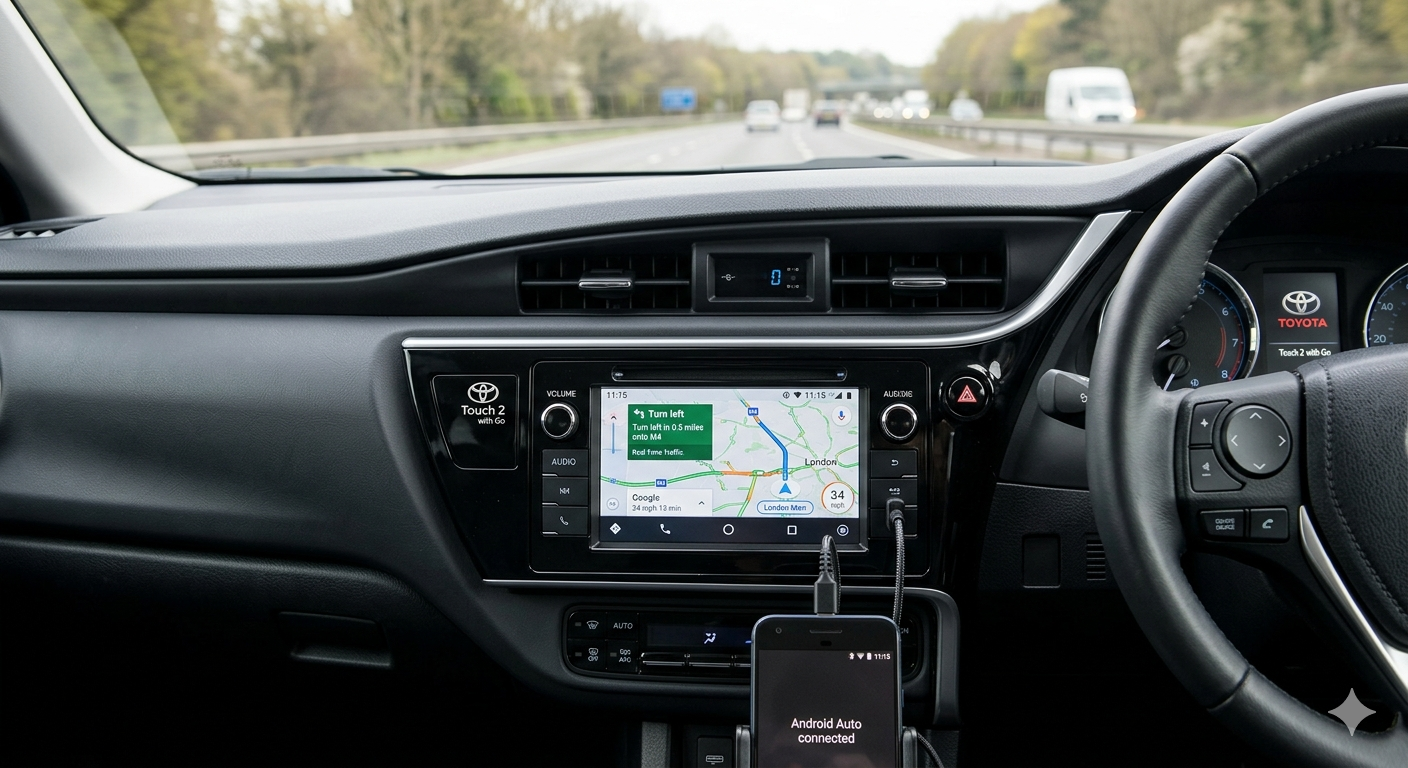
Once connected, the Toyota Auris Touch2 Android Auto experience is centered around navigation. Large, clear icons make it safer to navigate complex junctions.
- Real-time Traffic: Google Maps provides live updates that the factory “Go” system lacks.
- Voice Search: Use “Hey Google” to find gas stations or cafes without typing.
- Satellite View: Provides a high-definition look at your surroundings directly on the screen.
Audio Performance and Equalizer Settings
A common concern is whether audio quality suffers when passing through an external module. In most cases, the digital signal remains crisp.
- Bluetooth Handover: Some kits use the factory Bluetooth for audio and the module for visuals.
- In-App EQ: You can fine-tune Spotify or YouTube Music settings directly within the Android Auto interface.
- Mic Integration: Most kits allow you to use the car’s built-in microphone for clear calls.
Troubleshooting Common Connectivity Issues
If your Toyota Auris Touch2 Android Auto setup fails to launch, the culprit is often simpler than you think.
- Cable Quality: 90% of wired issues are solved by switching to an original manufacturer cable.
- Cache Clear: Occasionally, clearing the “Android Auto” cache on your phone resets the handshake.
- System Reboot: Holding the power button on the Touch 2 unit can resolve software hangs.
Future-Proofing Your Auris with 5G Adapters
As mobile networks evolve to 5G, ensuring your connection doesn’t bottleneck is essential for streaming high-quality audio and detailed maps.
- Hardware Speed: Choose modules that support 5GHz Wi-Fi for wireless Android Auto.
- App Updates: Keep the Android Auto app updated on the Play Store for the latest “Coolwalk” UI features.
- Device Cooling: Wireless adapters can get warm; ensure they have adequate ventilation behind the dash.
User Experience: Real-World Benefits for Auris Drivers
Drivers who have performed this upgrade often report a significant “new car” feel. It breathes life into an older interior.
- Messaging: WhatsApp and SMS messages are read aloud, and you can dictate replies.
- Calendar Sync: Your next appointment’s location automatically appears as a destination.
- Integration: View your car’s backup camera seamlessly even when the Android interface is active.
Cost-Benefit Analysis of the Upgrade
Is spending $300 on a retrofit worth it for a car that is 5 to 10 years old? For most, the answer is a resounding yes.
- Resale Value: A modern infotainment system is a major selling point for used car buyers.
- Safety: Reduces the temptation to look at a handheld phone while driving.
- Convenience: Eliminates the need for expensive and clunky factory map updates.
Comparing Factory Navigation vs. Android Auto
| Feature | Toyota Touch 2 with Go | Android Auto (Google/Waze) |
| Map Updates | Paid / Requires Dealer | Free / Automatic |
| Live Traffic | Basic (RDS-TMC) | High Precision (Crowdsourced) |
| Search Function | Local Database | Google Search (Online) |
| Voice Control | Limited / Scripted | Natural Language Processing |
Legal and Warranty Considerations
Before tearing into your dashboard, it is important to understand how these modifications affect your vehicle’s standing.
- Warranty: Most Auris models are now out of their original 5-year warranty, making this a low-risk upgrade.
- Reversibility: Interface kits are “non-destructive,” meaning you can remove them and return to stock easily.
- Insurance: Generally, these are considered minor accessories, but check with your provider if you replace the entire head unit.
Selecting the Right Android Auto Adapter
If you have a late-model Auris that already has a wired connection but you want it wireless, a simple USB dongle is all you need.
- AAWireless: The gold standard for stability and customization.
- Motorola MA1: Simple, reliable, and backed by a major brand.
- Carlinkit: Versatile but sometimes requires more firmware tinkering.
The Future of Toyota Connected Services
By 2026, Toyota is moving toward the “Arene” platform, focusing on 5G and AI integration. While the Auris won’t receive these updates, the aftermarket community continues to bridge the gap.
- Legacy Support: Developers are constantly updating retrofit firmware to match Google’s latest OS.
- AI Integration: New modules are beginning to incorporate voice-activated AI assistants beyond standard Google Assistant.
- Sustainability: Upgrading tech rather than the whole car is a greener way to enjoy modern features.
Frequently Asked Questions
Can I update my Toyota Auris Touch 2 firmware to get Android Auto?
Unfortunately, no. The hardware in the original Touch 2 units used in the Auris does not have the necessary architecture to support Android Auto via a simple software update. You will need to install an aftermarket hardware module or replace the head unit.
Is it difficult to install an Android Auto kit in a Toyota Auris?
For someone with basic DIY skills, it is a “moderate” task. It requires removing plastic trim and a few bolts. Most kits come with “T-harnesses” that plug directly into existing sockets, meaning no wire cutting is required.
Will my steering wheel buttons still work?
Yes, if you choose a high-quality interface module designed specifically for the Auris. These kits are engineered to intercept the CAN bus signals, allowing your volume, skip, and voice command buttons to function as they did before.
Does Android Auto work wirelessly in the Auris?
By default, no. However, if you install a modern retrofit module, many of them offer both wired and wireless capabilities. Alternatively, if you have a system with a USB port that supports Android Auto, you can add a wireless dongle.
Will I lose the factory Toyota menus and settings?
No. The beauty of an interface module is that it acts as an additional “source.” You can switch back to the original Toyota Touch 2 menus at any time to adjust vehicle settings, and the backup camera will still function normally.
Which is better for the Auris: a module or a new radio?
A module is better if you want to keep the original look of the dashboard and all factory features. A new radio (like a Pioneer or Sony unit) is better if you want a larger, higher-resolution screen and improved internal amplifiers for better sound.
What happens if I receive a phone call while using Android Auto?
The system is designed to handle this seamlessly. The music will mute, and the call screen will appear on the Touch 2 display. You can answer using the steering wheel buttons and talk through the car’s existing hands-free system.
Conclusion
Modernizing your Toyota Auris Touch2 Android Auto experience is one of the most impactful upgrades you can make to your vehicle. While Toyota’s legacy systems were not built with the smartphone era in mind, the vibrant aftermarket ecosystem has provided reliable, high-quality solutions that bring 2026-level technology to your 2015 dashboard. By opting for a dedicated interface module, you retain the classic aesthetic of your Auris while gaining access to the world’s most powerful navigation and entertainment tools.
The transition to a connected car environment significantly enhances safety by allowing you to keep your eyes on the road and hands on the wheel. Whether it’s the real-time traffic alerts of Google Maps or the convenience of voice-controlled messaging, the benefits are clear. As we move further into a decade dominated by AI and seamless connectivity, don’t let your car’s infotainment remain a relic of the past. Take the leap, invest in a quality retrofit, and enjoy every mile with the full power of Android at your fingertips. For those looking to explore specific modules or seeking installation professionals, your journey toward a smarter drive begins with choosing the right hardware for your specific Auris model.